Equipment Failure
Posted: Sun 2 June, 2013 Filed under: Bankruptcy, Change, Domestic, Finances, Geeky, Getting Old(er), Getting Organised, iPhone, Shopping, Technology, Thoughts, Weirdness 1 Comment »Don’t worry, this isn’t another post about the joys and pitfalls of getting older…
No, instead it’s about technology, and why the bastard stuff all ends up failing at the same time.
First of all, this post is being written on a new laptop – which I really could’ve done without having to get, but needs must when the devil drives (and/or you’re a web techie and wannabe-writer). The old Dell laptop – which it turns out I bought back in September 2009, so I shouldn’t whine so much, I guess – had been getting flakier over the last six months, but I’ve been eking out the life of it since then, suffering the occasional (and then more regular) hard-drive crash, and the ropy keyboard with some keys that only worked intermittently.
This week though it’s been crashing every time it was in use, and was obviously getting to the point where I needed to a) pull all the relevant data off it like NOW, and b) replace it with something else. And with a trip up to Manchester this week where I’m *really* going to need a reliable laptop, this was the weekend for it.
So I’ve bitten the bullet somewhat, and the new one is a (dirt-cheap) Asus thing, running the already-much-disliked Windows 8. To be fair to Windows 8, the old laptop was on the much-loathed Vista, which I never really found all that annoying. Eight annoys me more so far, but I’ll get used to it.
The other two equipment failures are both iPhone related, allbeit power-related rather than device-related. (Although I did think one of them might’ve been the phone being fucked, which was a real worry) First the Mophie battery case has failed. Again. (More accurately, the cable/charger for it, which will no longer charge) I love the Mophie cases, but they do seem to be somewhat crap, and only last about a year. And then the normal iPhone charge/sync cable also went kerfut and wouldn’t charge the phone. So I’ve had to get a new cable for that as well – considerably less expensive than the laptop purchase, but still, why all at the same time?
Oh yeah, and the fridge in the house also played up this week, with one day where it didn’t appear to be working all that well. Fortunately it’s now back up and running.
But why the hell would four things, two fairly major, all decide to kiff out within the same week? Weird things, I tell thee, weird things.
Counterfeits, and Real Refunds
Posted: Wed 17 October, 2012 Filed under: Customer Services, Domestic, iPhone Leave a comment »Back in March when I got the iPhone upgrade, I ordered a new Mophie Juice Pack Plus battery pack – I’d had one for the old iPhone, and really liked it. Plus it has the nice side-effect of doubling the battery life of the phone.
I bought the pack – me being me, the purple one – via Amazon (as I usually do)
Over this weekend, it stopped charging, and is basically broke and fucked. Not impressed. It was past the 90-day period on Amazon, so I contacted Mophie direct to ask what could be done.
I got a reply the next day, asking for the normal sort of thing – receipt, serial number etc., which got supplied.
Then yesterday they sent an email, saying that the battery pack I’ve bought is actually a counterfeit product, so Mophie can’t do anything about it. Understandable, but nightmare.
Anyway, I contacted the seller via Amazon (and left a warning on the product page) last night, just letting them know, but really expecting knack-all.
And today, I got an email, telling me that I’d been completely refunded for the purchase, to not worry about returning it or anything, very sorry, and that they’d actually stopped selling those packs recently following other concerns about their quality.
I’m annoyed about the pack’s death, but very, very impressed with the resultant customer service – both from the seller, and from Mophie themselves.
Phone Insurance – You couldn’t make this shit up
Posted: Mon 9 July, 2012 Filed under: 1BEM, Customer Services, Cynicism, Insurance, iPhone 2 Comments »This morning, I got three letters from CPP, the muppets company dealing with the claim for my knackered iPhone.
All three are dated the same day – 27th June! Nearly two weeks to get sent out – and all ‘signed’ by the same person. Combined, they make for a brilliant record of how CPP handle things. Well, it’s hilarious if you’re not receiving them.
- Letter 1 – “We need more information – proof of purchase, and a more detailed description of what happened”
- Letter 2 – “We need a more detailed description of what happened” – guess this means they’ve received the proof of purchase ?
- Letter 3 – “Claim denied”. So they’ve received a more detailed description? Or did the one in the initial phone call suddenly suffice?
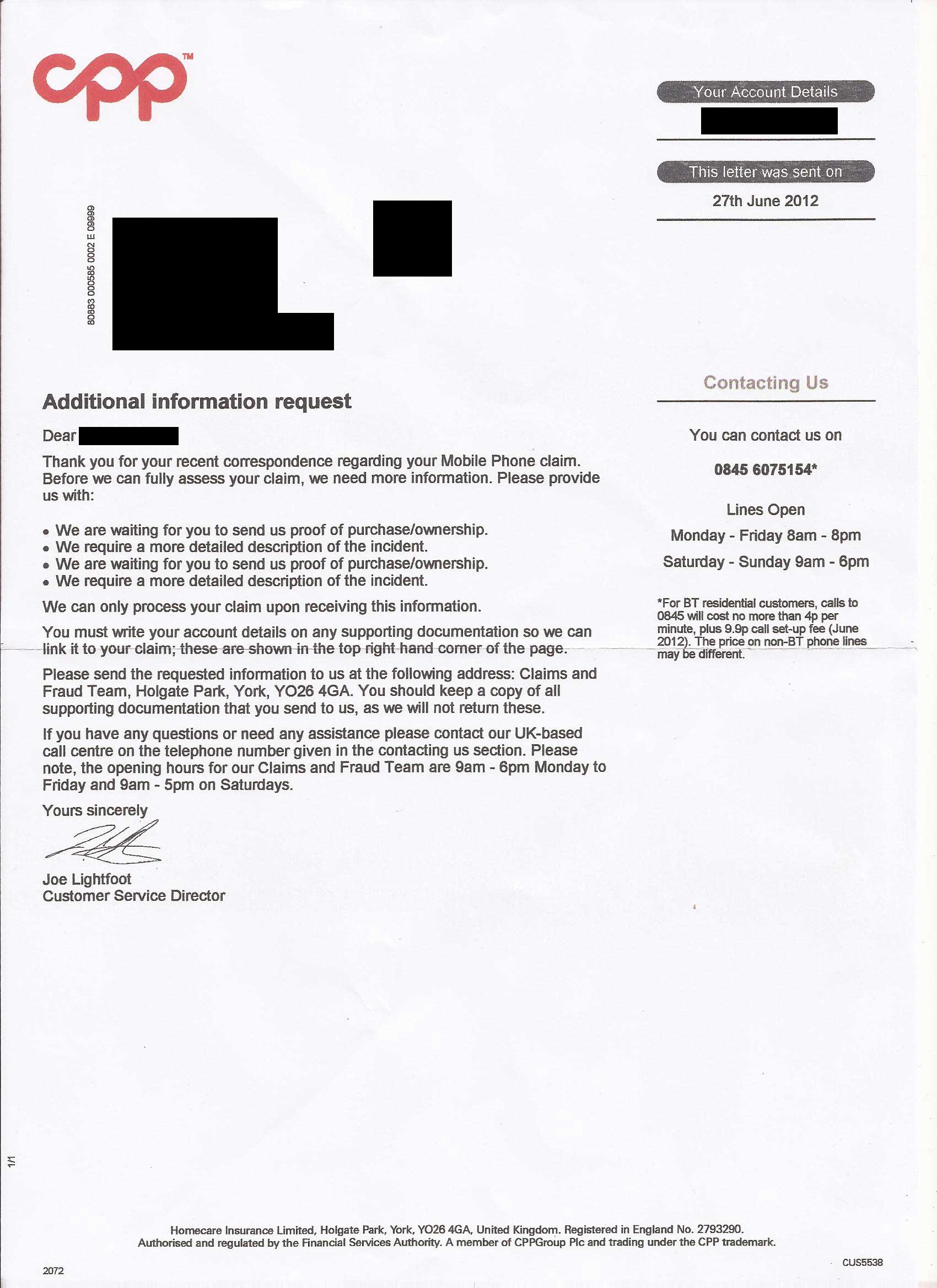
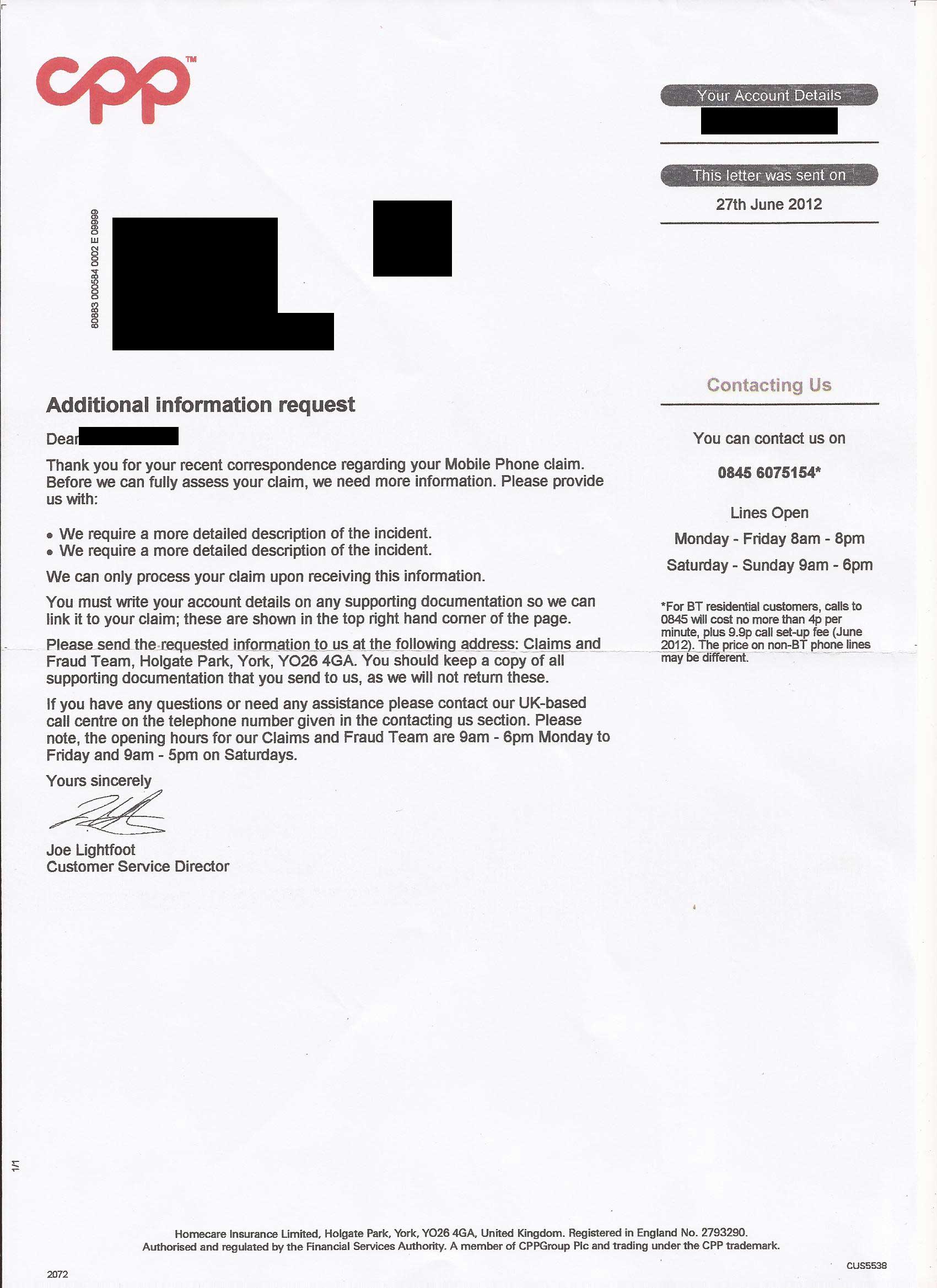
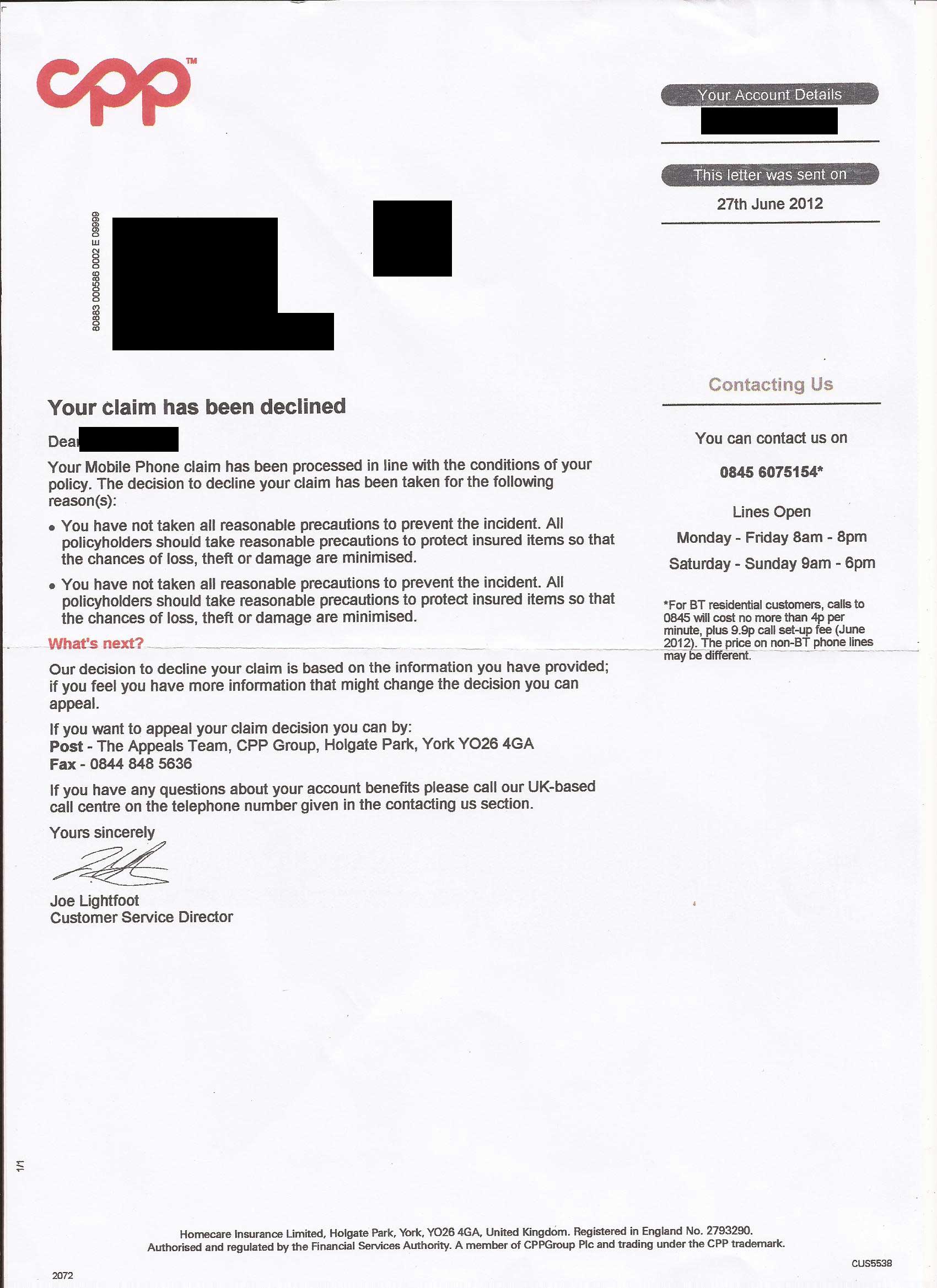
And bear in mind, this is all two weeks ago – it’s already been appealed, and complained about.
I wonder what excuse they’ll use for these letters, and the fact it’s taken two weeks to receive them…
Smartphone, Stupid App
Posted: Wed 21 March, 2012 Filed under: Charm School, Customer Services, Cynicism, Domestic, iPhone Leave a comment »Ah, RBS, I do so love the way you make life really complicated when it doesn’t need to be – and indeed shouldn’t be.
As I wrote before, I recently upgraded my phone to the iPhone 4S, which was a remarkably painless process. (I know, Apple stuff “just works”, but that’s not always been my experience, it’s safe to say – and there’s still a few niggles to sort out) All the Apps I’d purchased on the 3GS came over smoothly, all the contacts, blah blah, all worked fine – except for one.
Yep, the RBS “Mobile Banking” app wouldn’t work at all. Fair enough, security for banking, I can live with that. And there’s a button for requesting a new passkey. Clicky. Oh. It’s going to come in the post, and might take seven working days. Sheesh.
Seven working days on, nothing has appeared. So I call RBS Mobile Banking.
“Oh yes, we don’t send those any more.”
“…”
“Yes, what you need to do is text STOP (and yes, it has to be all in capitals) to 87727, then uninstall the existing app, reinstall it from the App Store, and go through the setup process.”
“You’re kidding, right? This is how RBS ‘make things easier’?”
“Yes, this is the quickest process for getting things done.”
Fuck sake. Anyway, it’s been done – but what a total bag of bollocks.
iDevice Upgrade
Posted: Mon 5 March, 2012 Filed under: 1BEM, Change, Domestic, Geeky, iPhone 2 Comments »Just under two years ago, I succumbed and got an iPhone. No-one was more surprised than me, as I wasn’t (and I’m still not) a fan of the Apple hype and fanboy obsessions with iDevices
As it turns out, I’ve been quite pleased with the iPhone, and it’s done everything it’s supposed to without annoying me too much. There’s niggles, but I think there’s niggles with any smartphone or similar device.
However, over the last couple of weeks, it’s been getting a bit flaky. The display had taken on a weird tendency to get a purple filter on it, which is visually interesting (and I must have some photo fun with a similar kind of effect, if I can manage it) but it was beginning to annoy.
Being well past the 18month contract, I went in to the local O2 shop over the weekend, and changed phone – to an iPhone 4S. (I’d previously had the 3GS) So far, I’m pretty pleased with it – and the backup/restore process to bring everything over from old phone to new was, I’m pleased to say, a really simple process.
I did look at other phones, Android OS and the like, but in the end the updated iPhone suited my requirements/use better than the other options. Again.
(Oh, and a quick thing – yes, 2 year device life is bobbins. Anyway, once I’ve cleared/reset it, I’m submitting the 3GS for recycling, which is better than nowt)
Word Lens
Posted: Sun 19 December, 2010 Filed under: Geeky, iPhone, Travel 2 Comments »It’s not often that I see a piece of technology that makes me go simply “Wow”. However, Word Lens brings forth exactly that response.
It’s basically a translation application for the iPhone, but what makes it different is that it works through the camera lens – hold the phone up to a sign in Spanish, and it’ll translate it – immediately – into English.
The demo app is free – which either removes words, or reverses them – and English-Spanish or Spanish-English cost £2.99 each. I assume that there’ll be other languages before long, and I certainly hope so. This kind of application is exceptional, and something that could/should change the way some translation is done.
Synapse Phones
Posted: Tue 26 October, 2010 Filed under: Advertising, Business, Geeky, iPhone, Technology Leave a comment »If you’re tired of run-of-the-mill “standard” smartphones, it looks like this may be something that’s of interest.
Synapse Phones will take your order for a customised smartphone (running Android 2.2) and ship it in Q1 of 2011
Think about for what you use your smartphone and what you will do with it. For example if you are someone who loves to take thousands of pictures, you can choose the 12MP camera and a xenon flash for taking pictures at night or under bad lighting conditions or if you want to store your whole music collection on your smartphone just choose a high amount of memory.
Seems like a good idea – and the prices aren’t epically unreasonable either. I hope it works out as a good business.
Loss of Sync
Posted: Wed 15 September, 2010 Filed under: Geeky, iPhone, Technology, Thoughts 4 Comments »When I got the iPhone (and on previous phones before that) one of the best things I used was a service called Zyb.com, which allowed you to synchronise contacts to their online database from your old phone, and then pull them down to the new phone. It made life *so* much easier, allowing you to do in ten minutes what otherwise turned into a dragged out and nightmarish process of copying contacts across one by one.
When Herself’s mother got an iPhone recently, I planned to do the same thing using Zyb, but I couldn’t. Because Zyb.com is no more.
A couple of years back now, Vodafone bought out Zyb, because it was such a good service. At the time they said it would carry on being available, and they’d got no plans to shut it down. Now though, they’ve closed down Zyb, and relaunched it (kind of) as part of Vodafone 360°. It’s nowhere near as good, fast or useful as it was as Zyb.
I’m really annoyed by this – despite having been a subscribed/signed-up user to Zyb, I didn’t get any notifications about the service closing down. It’s only having done other research about it that I find Zyb closed on 31st July.
As yet I haven’t found a decent replacement for Zyb that was as smooth and painless (and fast) as Zyb. Vodafone 360 took nearly three hours to sync things, and even then it’s not as good. Any suggestions?
Scrabble
Posted: Sun 5 September, 2010 Filed under: Domestic, Geeky, iPhone, Literacy, Sweary 6 Comments »One of the addictions I do have with the iPhone at the moment is the Scrabble® App. It’s not perfect – it cheats, and uses some really dodgy Americanised (sorry, Americanized) words which drive me barmy. But it’s fun, and I’m playing it way too much.
Today though I had a small dollop of success – allbeit in a silly and sweary way.
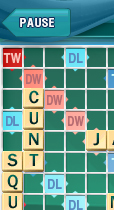
Yep, I got to swear properly in Scrabble. Aces.
Yes, the word ‘cunt’ in scrabble. And it was allowed! (Scored OK too…)
The full board here…
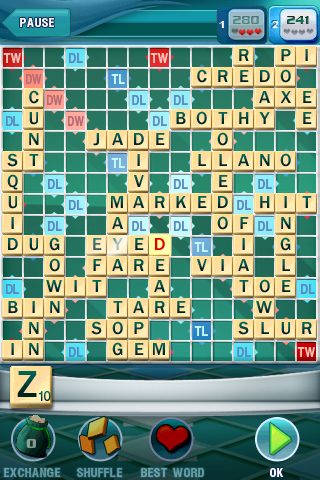
Can you tell what it is yet?
iPhone v4
Posted: Fri 11 June, 2010 Filed under: 1BEM, Geeky, iPhone, Thoughts 3 Comments »As regular readers know, I’ve now had my iPhone 3GS for a couple of months. I’ve been surprised by how well I do get on with it in a lot of ways (although it does have some epic frustrations as well, mainly based around the keyboard) and how much more I use it than I expected to.
But I’m still not an evangelist on the thing. I’m not addicted to it or obsessed with it, and if something better came along, I’d have no problem with moving away from the iPhone.
So – as someone asked yesterday – would I want the newly announced iPhone 4 ? Am I envious of the people who will have one? Do I feel the need to upgrade as soon as possible?
In short, no. There’s nothing really on the new iPhone that is a deal-breaker for me. In fact the only thing that I’d like from it is the more advanced/powerful battery. I don’t need/want any of the other little doohickeys. I don’t make video calls anyway – never have – and the rest of it was all a bit underwhelming, really.
So if this one breaks, I wouldn’t have an issue with replacing it with a v4 iPhone. But I’m not going to go out and upgrade for the hell of it, or to have the latest/greatest. It’ll be updated again in 6-12 months anyway.
iPhone + D4D
Posted: Wed 9 June, 2010 Filed under: D4D™, Geeky, iPhone, Photography, Thoughts 2 Comments »Since getting the iPhone a couple of months back, one development has surprised me more than any other. And that’s been the difference in how I use the phone and how D4D™ has changed since I got it.
Despite it’s comparatively crappy camera (bearing in mind that the previous phone had an 8Mp camera compared to this one’s 3Mp-ish) I’m using the camera part of the phone far more than on any other mobile I’ve had, and that has really surprised me. Some of it is, I suppose, the ease of taking photos off it – I primarily just email them to myself, and it’s a painless process, as opposed to that on the previous Sony-Ericsson phones. I don’t really know what the rest of the reasoning is, but whatever it is, it looks like D4D™ is becoming more photographic in nature.
That’s no bad thing of course. It’s just surprising (to me, anyway) that I’ve gone from pretty much all-written to having a noticeable portion of the posts having photos in them. Strange the way things work out, isn’t it? I don’t plan for D4D to turn into a full-on photoblog – I’ve got other plans on that score, thanks – but it’s just another change in the evolution of D4D™, I think.
Succumbed
Posted: Fri 30 April, 2010 Filed under: Domestic, Geeky, iPhone, Media 4 Comments »Of all the temptations on iPhone, my downfall has been Angry Birds. It got recommended a while back in the Guardian, so I got it on Herself’s phone – and damn it’s addictive.
I did complete all of the first release, which was the first time I’d played to completion since the eighties.
Anyway, I’d done really well and not got it on my own iPhone – after all, I’d completed it on Herself’s phone, so I didn’t need to do it again on mine.
This week though Angry Birds has had an update, new levels and all. So I’ve had to get it on my own phone.
Of course, this also means I’ve got to get through the first bits (again) in order to get to the new levels.
So that’s my Bank Holiday weekend sorted then.
Extended Life
Posted: Tue 27 April, 2010 Filed under: Geeky, Getting Organised, iPhone, Thoughts Leave a comment »One of the things that’s always irritated me about Herself’s iPhone is the piss-poor battery life it gets in everyday use. She has to recharge hers pretty much every day, which after a while just gets depressing. After all, it’s a step back to when I had my first digital mobile, back in 1994 (an Orbitel 902, if anyone cares) which needed charging daily. Since then my phones have gone up to being charged about twice a week at most, so going back to daily charging was always going to be a bit of an arse.
As a result, when I got my iPhone, I also ordered a Mophie Juicepack Air, which is an iPhone case with a built-in battery pack, which pretty much doubles the usable time of the iPhone. And of course me being me, it’s in a bright purple. You can get other colours, but once I saw the purple there wasn’t going to be any other colour that worked.
It’s taken nearly a week to get here, but it arrived yesterday and is in use now. And so far I’m damn impressed with it.
Battery life is definitely extended, it’s been easy to fit, set up and charge, and all told so far it’s a nice bit of kit.
A further review will follow in the next couple of weeks, I’m sure.
iPhoner
Posted: Wed 21 April, 2010 Filed under: Domestic, Geeky, Getting Organised, iPhone, Thoughts 5 Comments »I have to say, O2 are very impressive when it comes to delivering upgrade phones. I ordered the iPhone on Sunday afternoon, and on Monday it arrived at the office.
Of course, as I wasn’t in the office on Monday that made it a bit more awkward, but it was here on the desk when I came in on Tuesday, which meant that last night was spent setting it up, getting everything sorted and taking data etc. from old phone to new phone.
So far it’s all worked pretty well. Moving the contacts over is a piece of piss because I use Zyb, which is an online storage for contacts. Sync from old phone to Zyb, get the Zyb iPhone app and download from Zyb to new phone. That’s it. (And before any fanboys start piping up, that’s been easy because of Zyb, not because of the iPhone)
So yeah, it’s all OK so far. Set up the things I need, and I’m sure some other bits will get set up in the coming days.
But will I turn into an iPhone evangelist/obsessive? Somehow I doubt it. For a geek/techie I’m really not all that evangelical about technology in general. It’s a tool, not a belief system.
iPhone
Posted: Sat 17 April, 2010 Filed under: Domestic, Geeky, iPhone, Technology 4 Comments »After 18 months with my Sony Ericsson C905, it’s time to update my phone again. The Sony Ericsson has been a good phone, and there’s lots of bits I like with it. It’s getting some problems with its keypad and so on now, but it’s been an OK phone all round. I haven’t used the camera on it as much as I thought/hoped I would, and really it’s been mainly used (as are most of my phones in the end) for the basics – calls, text messages and emails, and internet access.
So with camera-resolution being less of an issue, I’ve decided to take the leap and get an iPhone. Herself swears by hers, and the other people I know with one also swear by it. I’m still unconvinced by the touchscreen – I’m used to touchtyping text messages on the normal phone keypad, and it seems a bit weird to not have that possibility with the iPhone. But I’m sure I’ll get used to it.
It’s going to be an interesting experience. I’ve got reservations about it, but the iPhone is the best of the bunch at the moment, and there was absolutely nothing else that appealed at all, nor anything that’s coming out in the near future. Should be entertaining, anyway.
iPhones Galore
Posted: Tue 25 August, 2009 Filed under: 1BEM, Cynicism, iPhone, Technology, Thoughts Leave a comment »On the journey into London yesterday, I couldn’t help but notice how ubiquitous the iPhone now is – it seems like everyone and their dog has one.
When I used to commute in to London from Bracknell, Blackberrys were the thing everyone had – or at least all the “Look at me, I’m so important” fucksticks had, anyway.
While I do agree that iPhones are a nice bit of kit, I’m still not convinced I’d actually use one if I had one. That lack of a “proper” keyboard is (for me) still a significant factor, as most of what I do on a phone involves typing – text messages, emails, SSH connections to servers for admin, that kind of thing.
But there’s also the ubiquity of it that’s (for me) detracts from any desire to own one. It may be childish, but I have a built-in reaction to doing “what everyone else does”, and while it’s not an over-arching reason for not getting one, it certainly contributes.
Migrating Contacts
Posted: Mon 3 August, 2009 Filed under: Geeky, Getting Organised, iPhone, Stupidity, Technology Leave a comment »As I said yesterday, one of the more interesting challenges with Herself’s new iPhone was getting the contacts to transfer across from her old Samsung G600 phone to the iPhone.
When it comes to contacts and phonebooks, Samsung are – to be polite about it – bloody awful. They don’t support useful standards like SyncML (basically a standard set of markup for addresses, contacts etc.) and instead stick to their own proprietary method. And their phones really don’t like giving up their data. In this case, it wouldn’t even send the information via BlueTooth, or save the details from the phone onto the SIM in order to transfer that across.
In short, a fucking abysmal experience when it comes to transferring away from a Samsung phone to anything else. (If memory serves, even Samsung to Samsung is a pain in the arse, let alone Samsung to anything else)
On my Sony-Ericsson phone, I can regularly sync the phonebook up to an online service called Zyb, who make the entire process pretty painless for phones that support SyncML. It also gives you a backup of the entire contacts database, which can be useful if (for example) you lose your phone, or have it stolen. They’re now owned by Vodafone, but in a fit of surprising sanity, Vodafone haven’t locked out non-Vodafone users from the service.
Through Zyb, when I upgraded my phone at the end of last year, importing the contacts etc. took ten minutes, and was one of the smoothest examples of that procedure I’ve ever done.
Anyway, on checking, it turns out the Zyb supports the iPhone – so that seemed to be the way to go.
After that, the process was fairly simple.
- Sign up Herself with an account at Zyb
- Install the iPhone app for Zyb (they even provide a link to it in the sign-up process, so it includes all the information necessary)
- Type in all the contacts from Herself’s Samsung, setting it up with correct addresses, merging mobile/contact/home/work numbers into one contact where necessary
- When done (about an hours work) sync the Zyb contacts onto the iPhone
- Job done.
Of course, if Samsung supported SyncML (or any other decent service) then it would’ve been a max of ten minutes to sort out. As it was, it took an hour. It could’ve been worse – far, far worse – if we’d been trying to do it via SIM or BlueTooth and then had to reorganise everything on the iPhone.
iPhone Replaced
Posted: Sun 2 August, 2009 Filed under: Domestic, Geeky, iPhone 3 Comments »The actual exchange of the iPhone went fine in the end – went in to Norwich to the Carphone Warehouse (where Herself had got the first one) and explained the situation, and we got a replacement phone straight away.
The replacement version has worked out well so far.
It’s been updated to the 3.0.1 OS, and all is still well. I’ve got it all fixed up now with the connection details for our wireless network, Herself’s email account and so on.
The only downside at the moment is the fact that transferring the contacts and phone numbers from Herself’s phone to the iPhone may be a pig – Samsung phones are utter shit when it comes to transferring the phonebook to anything else.
iPhone Hassles
Posted: Sat 1 August, 2009 Filed under: Customer Services, Domestic, iPhone, Reviews(ish) 1 Comment »Yesterday, Herself went out and got an Apple iPhone from Carphone Warehouse.
Initially I was fairly impressed with it, there’s some nice interactions and stuff going on.
However, today we (OK, I) updated it to the latest version of the operating system, version 3.0.1. And since then the new iPhone has been a nightmare.
Firstly, Herself always has a lockcode set on the phone, so when you turn it on, you enter a four-digit PIN. Normally, no problem. However, as part of the upgrade to 3.0.1, the iPhone needs to connect back to iTunes, and iTunes can’t do that with a lock code set. Oh, and the iPhone wouldn’t do anything except say “connect me to iTunes”. Nothing else, no way to enter the lock code.
Cue a call to O2 to find out what needs doing, and then one to Apple. Which resulted in…
Factory Reset Number One. Yep, roll it all the way back to how we got it, loss of any settings we’d sorted. Square One. And an OS upgraded to 3.0.1.
And all was well. Um, except for not having any access to wi-fi settings (as in “Not installed” rather than “Not available”) or Bluetooth®. Totally greyed out, nothing there at all.
So a few resets, and another call to Apple.
Half an hour later, Factory Reset Number Two – and still no improvement.
So tomorrow we’re off to Carphone Warehouse, armed with an Issue Number from Apple, to get a replacement iPhone.
Let’s hope that one works better.
I’m not slagging off the iPhone per se – however, my experience with it so far has emphatically not been the most positive one. We’ll see how things go with the second one before I write up a valid review of it…